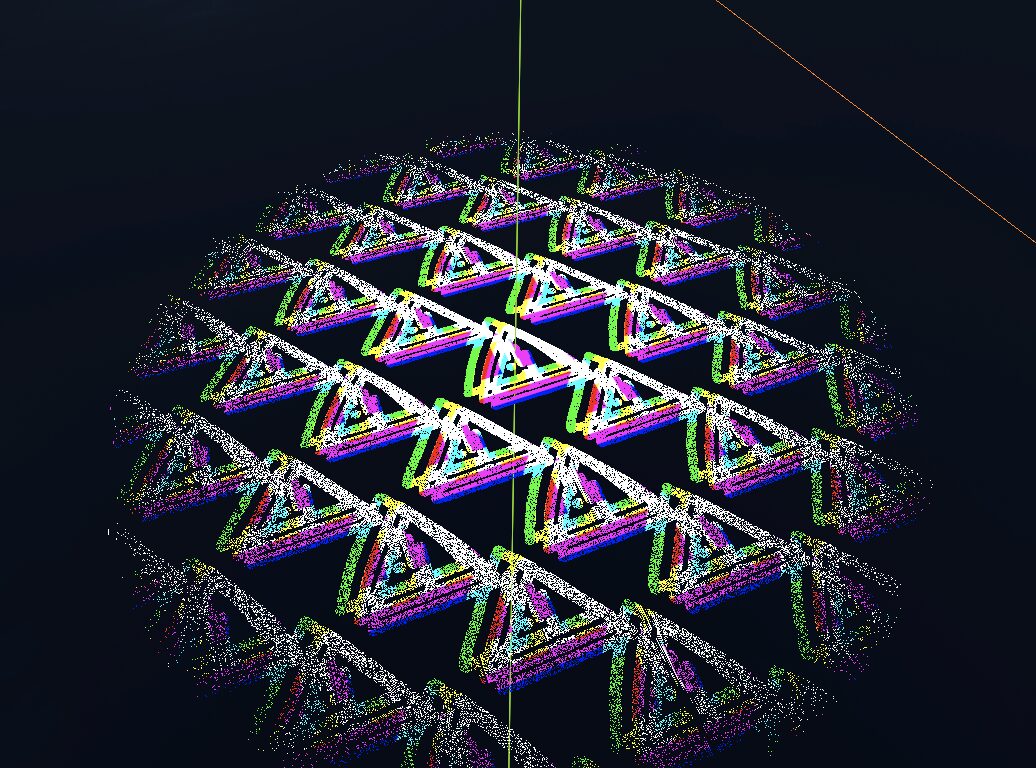
Glitch worldborder but it has a very specific implementation idk

Attach this shader to a plane (I used one facing straight up to act as a falling death barrier) and write a script to pass the player’s distance to the plane to the shader. Here’s a function that comes in handy for that (where self is the plane with the shader on it):
self.mesh.surface_get_material(0).set("shader_parameter/player_dist", player.global_position.y - self.global_position.y);Not only does the plane fade in as you get close, the glitch effect also gets stronger, which looks pretty neat when you’re falling into it.
I’ve attached the “warning” texture I used in the screenshots section (I made it very quickly it’s not very clean lol).
Shader code
shader_type spatial;
render_mode unshaded;

uniform sampler2D albedo_texture;

uniform float uv_scale = 10;

uniform float max_player_dist = 5;
uniform float player_dist = 0;

uniform float glitch_intensity = 0.04;

float random(float seed) {
    return fract(sin(dot(vec2(TIME + seed, TIME - seed),
        vec2(12.9898,78.233))) * 43758.5453123);
}

void fragment() {

	vec2 centered_uv = vec2((UV.x - 0.5) * 2.0, (UV.y - 0.5) * 2.0);
	float center_dist = centered_uv.x * centered_uv.x + centered_uv.y * centered_uv.y;

	float player_dist_factor = 1.0 - player_dist / max_player_dist;

	if (center_dist + random(UV.x) > player_dist_factor) {
		discard;
	}

	float glitch_offset = glitch_intensity * player_dist_factor;

	vec4 sample_center = texture(albedo_texture, uv_scale * UV);
	vec4 sample_up = texture(albedo_texture,
		uv_scale * UV + vec2(glitch_offset + random(10.0) * glitch_offset, glitch_offset + random(45.0) * glitch_offset)
		);
	vec4 sample_down = texture(albedo_texture,
		uv_scale * UV - vec2(glitch_offset + random(20.0) * glitch_offset, glitch_offset + random(5.0) * glitch_offset)
		);

	if (sample_center.a < 0.5 && sample_up.a < 0.5 && sample_down.a < 0.5) {
		discard;
	}

	ALBEDO = vec3(sample_center.r, sample_up.r, sample_down.r);
}
Live Preview