
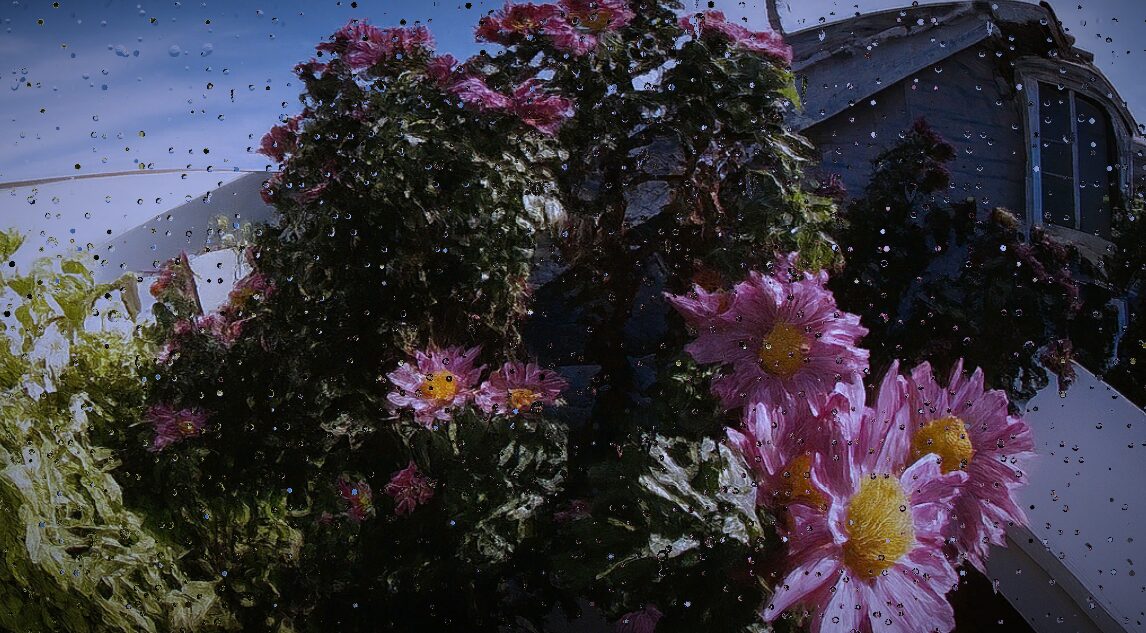
Rain on Glass

This is an advanced Screen-Space Shader adapted for Godot 4’s CanvasItem that simulates dynamic rain running down a glass surface (like a window or camera lens). The effect blends complex procedural logic with visual post-processing.
The shader works by:
-
SDF Drop Generation: Using a custom Signed Distance Field (
sdEgg) to define the precise, rounded shape of individual raindrops, including the tear-like tail for movement. -
Layered Movement: Generating multiple layers of rain (static drops, slow-moving trails, and faster drops) whose visibility is controlled by the
rain_amountuniform. -
Refraction and Distortion: Calculating the normal vector (
n) of the accumulated drop map and using it to displace theSCREEN_TEXTUREcoordinates, creating a realistic refraction effect. -
Dynamic Blur: Applying a variable blur (
focus) usingtextureLod, which blurs the background more heavily when dense water trails (c.y) are present.
Adjustable Uniforms (Shader Parameters):
Shader code
shader_type canvas_item;

render_mode unshaded;
uniform float rain_amount : hint_range(0.0, 1.0) = 0.7;
uniform float blue_amount : hint_range(0.0, 1.0) = 1.0;
uniform sampler2D SCREEN_TEXTURE : hint_screen_texture;

const float M_PI = 3.14159;
const float M_2PI = 6.28318;

vec3 N13(float p) {
	vec3 p3 = fract(vec3(p) * vec3(.1031, .11369, .13787));
	p3 += dot(p3, p3.yzx + 19.19);
	return fract(vec3((p3.x + p3.y) * p3.z, (p3.x + p3.z) * p3.y, (p3.y + p3.z) * p3.x));
}

float N(float t) {
	return fract(sin(t * 12345.564) * 7658.76);
}

float Saw(float b, float t) {
	return smoothstep(0.0, b, t) * smoothstep(1.0, b, t);
}

float sdEgg(vec2 p, float ra, float rb) {
	const float k = sqrt(3.0);
	p.x = abs(p.x);
	float r = ra - rb;
	return ((p.y < 0.0) ? length(vec2(p.x, p.y)) - r : (k * (p.x + r) < p.y) ? length(vec2(p.x, p.y - k * r)) : length(vec2(p.x + r, p.y)) - 2.0 * r) - rb;
}

vec2 DropLayer2(vec2 uv, float t, vec2 densityScale) {
	vec2 a = vec2(6.0, 1.0) * densityScale;
	vec2 grid = a * 2.0;
	vec2 id = floor(uv * grid);
	float gridFall = N(id.x) / 3.0 + 0.5;

	uv.y -= t * gridFall / a.y;

	id = floor(uv * grid);
	uv.y += N(id.x);
	id = floor(uv * grid);
	vec2 st = fract(uv * grid) - vec2(0.5, 0.0);
	vec3 n = N13(id.x * 35.2 + id.y * 2376.1);
	float x = n.x - 0.5;

	// Suavizamos el balanceo horizontal para que no rompa la dirección de caída
	x += sin(uv.y * 20.0 + sin(uv.y * 20.0)) * (0.5 - abs(x)) * (n.z - 0.5) * 0.3;
	x *= 0.6;

	float ti = fract(t * (gridFall + 0.1) + n.z);

	// CAMBIO: Ahora 'y' va estrictamente de 1.0 a 0.0 (de arriba a abajo) de forma lineal/suave
	float y = 1.0 - ti;

	// CAMBIO: Ajustamos la deformación física de la gota para que no "salte" hacia arriba al final
	float dropShape = mix(0.0, -0.2, ti);

	float d = sdEgg((st - vec2(x, y)) * a.yx, 0.0, dropShape);
	float diameter = N(id.x + id.y) / 7.0 + 0.2;
	float mainDrop = smoothstep(diameter / 1.5, 0.0, d);

	// CAMBIO: El rastro (trail) ahora sigue correctamente a la gota hacia abajo
	float r2 = smoothstep(1.0, y, st.y);
	float trail = smoothstep(diameter * 0.75 * sqrt(r2), 0.0, abs(st.x - x));
	trail *= r2 * smoothstep(-0.05, 0.05, st.y - y) * 0.5;

	return vec2(mainDrop, trail);
}

float StaticDrops(vec2 uv, float t) {
	uv *= 40.0;
	vec2 id = floor(uv);
	vec3 n = N13(id.x * 106.45 + id.y * 3543.654);
	vec2 center = (n.xy - 0.5) * 0.6;
	uv = fract(uv) - 0.5;
	float d = length(uv - center.xy);
	float drop = smoothstep(0.3, 0.0, d);
	float fade = Saw(0.10, fract(t + n.y));
	return drop * fade * fract(n.z * 27.0);
}

vec2 Drops(vec2 uv, float t, float l0, float l1, float l2) {
	float s = StaticDrops(uv, t) * l0;
	vec2 m1 = DropLayer2(uv, t, vec2(1.0)) * l1;
	vec2 m2 = DropLayer2(uv * 1.85, t, vec2(1.0)) * l2;
	float c = smoothstep(0.3, 1.0, s + m1.x + m2.x);
	return vec2(c, m1.y + m2.y);
}

void fragment() {
	vec2 resolution = 1.0 / SCREEN_PIXEL_SIZE;
	vec2 aspect_uv = (FRAGCOORD.xy - 0.5 * resolution.xy) / resolution.y;
	float t = TIME * 0.2;

	float staticDrops = smoothstep(-0.5, 1.0, rain_amount) * 2.0;
	float layer1 = smoothstep(0.25, 0.75, rain_amount);
	float layer2 = smoothstep(0.0, 0.5, rain_amount);

	vec2 c = Drops(aspect_uv, t, staticDrops, layer1, layer2);

	vec2 e = 0.5 / resolution;
	float cx = Drops(aspect_uv + vec2(e.x, 0.0), t, staticDrops, layer1, layer2).x;
	float cy = Drops(aspect_uv + vec2(0.0, e.y), t, staticDrops, layer1, layer2).x;
	vec2 n = vec2(cx - c.x, cy - c.x);

	float maxBlur = mix(3.0, 6.0, rain_amount);
	float minBlur = 2.0;
	float focus = mix(maxBlur - c.y, minBlur, smoothstep(0.1, 0.2, c.x));

	vec3 col = textureLod(SCREEN_TEXTURE, SCREEN_UV + n, focus).rgb;

	vec3 target_color = mix(vec3(1.0), vec3(0.8, 0.9, 1.3), blue_amount);

	float colFade = sin(t * 0.2) * 0.5 + 0.5;
	col *= mix(vec3(1.0), target_color, colFade);

	vec2 vignette_uv = SCREEN_UV - 0.5;
	col *= 1.0 - dot(vignette_uv, vignette_uv);

	COLOR = vec4(col, 1.0);
}
Live Preview

I love this shader, but why are some of the droplets at high speed going upwards? I tried fiddling around but I couldn’t figure it out
Change this line found in DropLayer2
uv.y -= t * gridFall / a.y;
to
uv.y -= -t * –gridFall / a.y;
I already changed the main one, but if you only want to change the affected line…
Change the vertical oscillation to a strict linear drop
float y = 1.0 – ti;
to
float dropShape = mix(0.0, -0.2, ti);
But I recommend you copy and paste the shader again.