
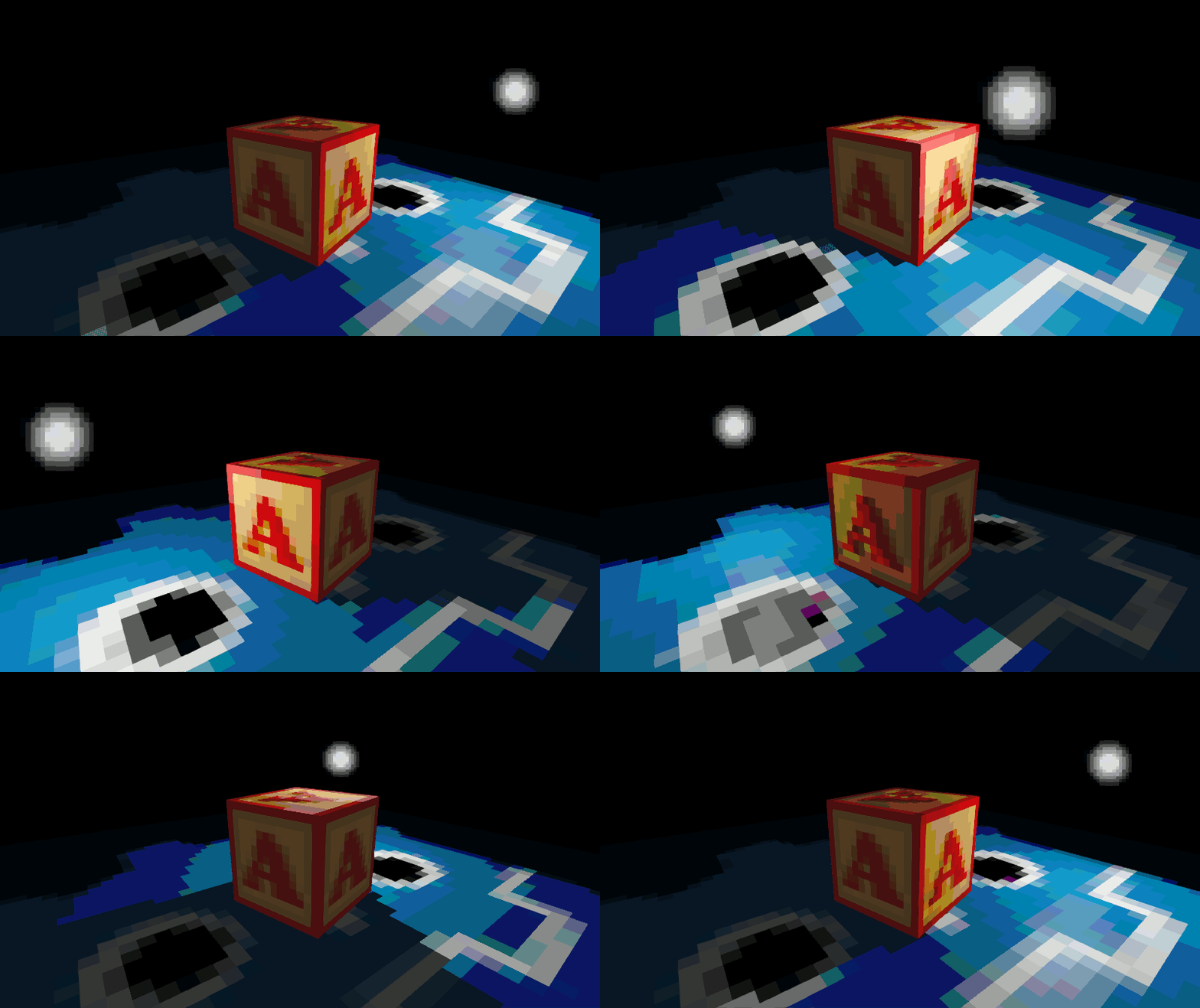
Texel Space Quantization

The finest in gay furry technology, also taking inspiration from this snippet with the formatting. Mainly useful for faux-retro pixelated shadows. You can either copy these functions directly into your shader or separate them out as their own shader include.
// Calculate screen-space displacement from the center of the current texel
vec2 screen_delta(vec2 uv, sampler2D tex) {
	vec2 tex_size = vec2(textureSize(tex, 0));
	vec2 texel_center = (floor(uv * tex_size) + 0.5) / tex_size;
	vec2 offset = texel_center - uv;
	mat2 screen_to_uv = mat2(dFdx(uv), dFdy(uv));
	mat2 uv_to_screen = inverse(screen_to_uv);
	return uv_to_screen * offset;
}

// Snap vec_type to extrapolated value at the center of the current texel
float texel_snap(float v, vec2 delta) {
	return v + dFdx(v) * delta.x + dFdy(v) * delta.y;
}

vec2 texel_snap(vec2 v, vec2 delta) {
	return v + dFdx(v) * delta.x + dFdy(v) * delta.y;
}

vec3 texel_snap(vec3 v, vec2 delta) {
	return v + dFdx(v) * delta.x + dFdy(v) * delta.y;
}

vec4 texel_snap(vec4 v, vec2 delta) {
	return v + dFdx(v) * delta.x + dFdy(v) * delta.y;
}
To use these functions you first get a screen_delta from your UV coordinates and texture, then feed that into texel_snap along with whatever value you want to quantize.
vec2 delta = screen_delta(UV, albedo_map);
LIGHT_VERTEX = texel_snap(VERTEX, delta);
NORMAL = texel_snap(NORMAL, delta);
The shader code below uses my standard lighting shader include and celyk’s accumulation hack to create a posterized PBR effect.
Shader code
shader_type spatial;

#include "texel_snap.gdshaderinc"

// https://godotshaders.com/shader/standard-lighting-shader-include/
#define DIFFUSE_LAMBERT
#define SPECULAR_SCHLICK_GGX
#include "standard_lighting.gdshaderinc"

uniform int posterize_levels = 16;
uniform sampler2D albedo_map : source_color, filter_nearest_mipmap;
uniform sampler2D normal_map : hint_normal, filter_nearest_mipmap;
uniform float roughness : hint_range(0.0, 1.0) = 1.0;
uniform float metallic : hint_range(0.0, 1.0) = 0.0;
uniform vec2 uv_tiling = vec2(1.0);
uniform vec2 uv_offset = vec2(0.0);

void vertex() {
	UV = (UV + uv_offset) * uv_tiling;
}

void fragment() {
	// Snap LIGHT_VERTEX and NORMAL for pixelated shadows
	vec2 delta = screen_delta(UV, albedo_map);
	LIGHT_VERTEX = texel_snap(VERTEX, delta);
	NORMAL = texel_snap(NORMAL, delta);

	// Snap TANGENT and BINORMAL to support normal mapping
	TANGENT = texel_snap(TANGENT, delta);
	BINORMAL = texel_snap(BINORMAL, delta);

	ALBEDO = texture(albedo_map, UV).rgb;
	NORMAL_MAP = texture(normal_map, UV).xyz;
	ROUGHNESS = roughness;
	METALLIC = metallic;
}

void light() {
	vec3 d = vec3(0.0), s = vec3(0.0);
	STANDARD_LIGHTING(d, s);

	DIFFUSE_LIGHT += ALBEDO * d + s;
	float l = float(posterize_levels);
	SPECULAR_LIGHT = floor(DIFFUSE_LIGHT * l) / l;
	SPECULAR_LIGHT -= ALBEDO * DIFFUSE_LIGHT;
}
That is awesome! Been looking for something like this for a long time.
Here is this shader merged with a generic standardMaterial + normal map
// NOTE: Shader automatically converted from Godot Engine 4.5.1.stable.mono's StandardMaterial3D. shader_type spatial; render_mode blend_mix, depth_draw_opaque, cull_back, diffuse_burley, specular_schlick_ggx; uniform vec4 albedo : source_color; uniform sampler2D texture_albedo : source_color, filter_nearest_mipmap, repeat_enable; uniform ivec2 albedo_texture_size; uniform float point_size : hint_range(0.1, 128.0, 0.1); uniform float roughness : hint_range(0.0, 1.0); uniform sampler2D texture_metallic : hint_default_white, filter_nearest_mipmap, repeat_enable; uniform vec4 metallic_texture_channel; uniform sampler2D texture_roughness : hint_roughness_r, filter_nearest_mipmap, repeat_enable; uniform float specular : hint_range(0.0, 1.0, 0.01); uniform float metallic : hint_range(0.0, 1.0, 0.01); uniform vec3 uv1_scale; uniform vec3 uv1_offset; uniform vec3 uv2_scale; uniform vec3 uv2_offset; void vertex() { UV = UV * uv1_scale.xy + uv1_offset.xy; } // Calculate screen-space displacement to the center of the current texel vec2 screen_delta(vec2 uv, sampler2D tex) { vec2 tex_size = vec2(textureSize(tex, 0)); vec2 texel_center = (floor(uv * tex_size) + 0.5) / tex_size; vec2 uv_delta = texel_center - uv; mat2 screen_to_uv = mat2(dFdx(uv), dFdy(uv)); mat2 uv_to_screen = inverse(screen_to_uv); return uv_to_screen * uv_delta; } // Snap vector to the value at the center of the current texel // Note this works for any vec type (float, vec2, vec3, vec4) vec3 texel_snap(vec3 v, vec2 delta) { return v + dFdx(v) * delta.x + dFdy(v) * delta.y; } // Simple posterized lighting void light() { #define levels 12.0 float n_dot_l = clamp(dot(NORMAL, LIGHT), 0.0, 1.0); float i = n_dot_l * ATTENUATION; i = floor(i * levels) / levels; DIFFUSE_LIGHT += LIGHT_COLOR / PI * i; } uniform sampler2D normal_map: hint_normal; void fragment() { vec2 base_uv = UV; vec4 albedo_tex = texture(texture_albedo, base_uv); ALBEDO = albedo.rgb * albedo_tex.rgb; vec2 delta = screen_delta(UV, texture_albedo); LIGHT_VERTEX = texel_snap(VERTEX, delta); NORMAL = texture(normal_map, UV).xyz; NORMAL = texel_snap(NORMAL, delta); ALBEDO = texture(texture_albedo, UV).rgb; float metallic_tex = dot(texture(texture_metallic, base_uv), metallic_texture_channel); METALLIC = metallic_tex * metallic; SPECULAR = specular; vec4 roughness_texture_channel = vec4(1.0, 0.0, 0.0, 0.0); float roughness_tex = dot(texture(texture_roughness, base_uv), roughness_texture_channel); ROUGHNESS = roughness_tex * roughness; }Nice, you’ll wanna take out the custom light function though or else the PBR values won’t have any effect 😅
How does one apply this shader??
You apply it as a ShaderMaterial on objects you want to have pixelated shading. If you’re looking to apply it as a post-processing effect, that’s not really possible in Godot’s default renderer without some very complicated setup.
What is the STANDARD_LIGHTING function? And where can I find standard_lighting.gdshaderinc?
You can find it here. I’ll add the URL as a comment in the shader so it’s more clear.
Is there a way to separate the texel size from UV side? I’m trying to not scale my texture, just the lighting “sub” texel to have smaller, pixelated lighting.
You could change the screen_delta function so it takes in a vec2 tex_size and pass some multiple of your texture resolution
Thank you, that put me on the right path.
What about if I wanted to rotate the texel grid off of the UV’s axis?
I’m trying to get the texel orientation aligned with the world xyz, or otherwise capable of manual rotation to accomplish that.
That would involve rotating your UV coordinates (there are various tutorials online) before passing them to the screen delta function. For snapping to world XYZ you could actually do something as simple as:
Although, that tends to have self-shadowing artifacts so it might not be ideal.
hm, per-texel eh.. i wonder if you could make it look like if its per-vertex
How would you adapt this to work with a triplanar texture?
Triplanar shaders usually blend a few texture samples, it’s not clear how you’d snap to multiple textures at once in that case. I’d try just taking the coordinates in the closest plane
hi, im quite a bit of a dumbass, could you perhaps make a step by step on how to implement this shader? if its not much of an inconvenience of course, thanks in advance
For the example shader you can make a “shaders” folder with these files:
standard_lighting.gdshaderinc – this code
texel_snap.gdshaderinc – first code block in the post above
posterized.gdshader – last code block (under Shader Code)
This website is more geared toward plug-and-play solutions but I chose to format it this way for organization and ease of reuse. Also you’re not dumb, you’re learning 🙂
i just ran into this excellent shader after messing with the same effect myself and i’m wondering if i have ran into an actual bonafide floating point error
it’s almost impossible to see when not palettizing/posterizing but it shows up even in the preview gif on this page; occasionally a texel will have two different colors depending on view angle. i’ve tried to dive deep into this and figure out what’s going on and to my surprise on an unposterized output the error is still there but the difference in color is a single bit. half the texel might be #5d471c while the other half is #5d461c. this only becomes a problem when posterizing as those bit differences inevitably end up straddling the divide between colors
i’ve included a couple of images


after consulting some much smarter friends they concluded that it’s an accumulation error and they had no ideas how to fix this or if a fix is possible. what do you think? any ideas?
I’m having a hard time replicating this unfortunately. The little bit of dithering you see in the preview is due to the shadow blur on the OmniLight (should’ve set it to 0 tbh):
Otherwise, I’m getting perfectly solid blocks. My best guess as to your culprit would be the floor function. I’ve had similar issues trying to do ‘voxelized’ lighting by flooring world coordinates, you end up with these z-fighting-y artifacts at near-integer positions.
you’re testing on a flat surface and i suspect that this is a problem that gets worse with curved surfaces/grazing angles
here’s a simple example with an empty scene, cylinder with the shader and a single omnilight with no shadows, you can see the effect in motion here by the texel “wiping” between two colors as the angle of the camera changes
without the posterization this would be impossible to notice since again the color difference is just 1 bit however with posterization it becomes very obvious in a complex scene
another example for good measure, you can see the “wiping” happening all over this
I still wasn’t able to replicate the ‘wiping’ effect, even with round shapes. Due to the way this technique works there are always going to be discontinuities when a texel covers more than one face, but I’m not sure that fully explains what you’re seeing.
I investigated the one-bit error some more, I wasn’t able to find any obvious noise in the inputs. It really could be purely a floating point precision thing; every fragment needs to independently predict where the center of the current texel is based solely on screen space derivatives. With the magnitudes and how many calculations are involved, I wouldn’t be surprised if it’s just really hard for every fragment to land on the exact same value.
It might be best if you simply preprocess the light values before posterizing, lol. That’s about all I can offer, let me know if you find out anything else.
now i’m really curious why you can’t replicate it… could it be because the mesh has a normal map? i’ll investigate this more but with the nature of the error being so incredibly tiny i’m still leaning towards floating points. the idea of clamping the light values is interesting too, for something this crunchy that could be an easy fix if it works!
if you’re interested in looking at this more i could easily make a MRP
damnit i think it really is the addition of a normal map that causes it
TANGENT = texel_snap(TANGENT, delta);
BINORMAL = texel_snap(BINORMAL, delta);
Nice catch 😂
oh gosh, i was resigned to this not being fixable and you solved it right quick! thank you thank you
just to be annoying i found there still A Weirdness that can very rarely happen and maybe this one is truly a floating point thing. it took me a few minutes of rotating to get this pic which shows how rare and hard to replicate it is and it’s not nearly as visually disruptive as the “wiping” but i figured i’d document it while i’m at it
it’s a similarly odd bit thing to the previous issue, here the original pre-posterized pixels are #404039 and #414139 respectively
Yeah, that’s the thing I was talking about in the second paragraph here, it’s a separate issue from the normal map one. I couldn’t find any explanation for it so I’m left to conjecture it’s a precision constraint.
gotcha! i wonder, do mp4’s embed on here? e: nope! let’s try gif

https://i.imgur.com/GiHjVMh.mp4
i have gotten so tired of antialiasing i am now fully pro aliasing. thank you so much for making this possible!
For anyone who wants a UV scale independent of the light square size I’ve found that replacing the tiling size with a new size variable in all places except for the vec2 delta = screen_delta part works. This allowed me to resize the uv scale while keeping the light tiling unchanged.
Is there documentation, a forum maybe, for this besides the Unity thread? I’ve been trying to get this working for hours but it either breaks everything or simply doesn’t do anything.