
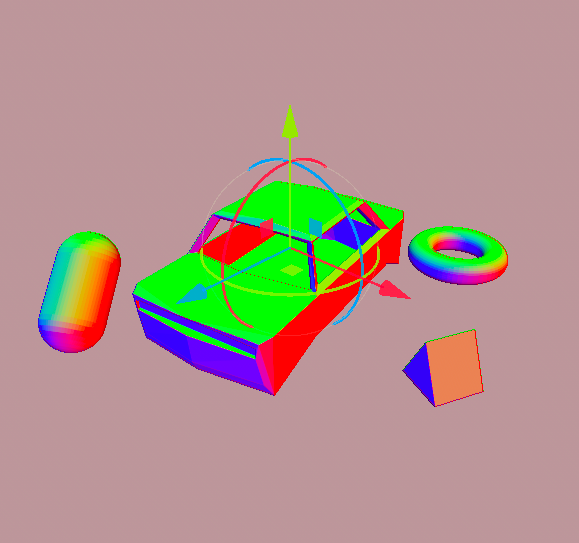
World normals from screen depth

Didn’t find a simple and clear example of getting world normals inside a post-processing effect, so I’m sharing my own.
This method samples depth texture 3 times (pixel and its right and top neighbours), calculates world positions for those pixels, and finally gets the normal based on cross product.
This shader is obviously not intended for use in-game directly. Feel free to copy and use the world normals however you like.
Basic scene setup (post-process scene setup from docs):
- Create MeshInstance with “Quad” mesh and set its size to 2×2 m and enable “Flip Faces”.
- Set MeshInstance “extra_cull_margin” to maximum (16k) and disable “Cast Shadow”.
- Set the created quad mesh as a child of your main camera.
- Create Shader resource and copy the code.
- Create ShaderMaterial resource, set the shader and attach the material to the MeshInstance.
After setting up the scene, you should see every surface change color based on its normal direction.
Shader code
// CC0, shadecore_dev, 2025.
shader_type spatial;
render_mode unshaded, fog_disabled;

uniform sampler2D depth_texture : hint_depth_texture;

void vertex() {
	POSITION = vec4(VERTEX.xy, 1.0, 1.0);
}

vec3 reconstruct_world_position(vec2 uv, float depth, mat4 inv_proj_matrix, mat4 inv_view_matrix) {
	#if CURRENT_RENDERER == RENDERER_COMPATIBILITY
	vec3 ndc = vec3(uv, depth) * 2.0 - 1.0;
	#else
	vec3 ndc = vec3(uv * 2.0 - 1.0, depth);
	#endif

	vec4 view = inv_proj_matrix * vec4(ndc, 1.0);
	view.xyz /= view.w;

	vec4 world = inv_view_matrix * inv_proj_matrix * vec4(ndc, 1.0);
	return world.xyz / world.w;
}

void fragment() {
	vec2 uv_center = SCREEN_UV;
	vec2 uv_right = SCREEN_UV + vec2(1, 0) / VIEWPORT_SIZE;
	vec2 uv_top = SCREEN_UV + vec2(0, 1) / VIEWPORT_SIZE;

	float depth_center = texture(depth_texture, uv_center).x;
	float depth_right = texture(depth_texture, uv_right).x;
	float depth_top = texture(depth_texture, uv_top).x;

	vec3 center = reconstruct_world_position(uv_center, depth_center, INV_PROJECTION_MATRIX, INV_VIEW_MATRIX);
	vec3 right = reconstruct_world_position(uv_right, depth_right, INV_PROJECTION_MATRIX, INV_VIEW_MATRIX);
	vec3 top = reconstruct_world_position(uv_top, depth_top, INV_PROJECTION_MATRIX, INV_VIEW_MATRIX);

	vec3 world_normal = normalize(cross(top - center, right - center));

	ALBEDO = world_normal;
}

Your method for obtaining normals is amazing. Thanks for sharing. It creates a very interesting faceted effect.
If you want to obtain Normals for a post-processing effect, you can access the Normal Buffer.
To get the Normals in World Space it would be something like:
shader_type spatial;
uniform sampler2D _ScreenNormalRoughnessTexture : hint_normal_roughness_texture; // Get Normal Roughness buffer
void fragment()
{
/* Get Normal */
vec3 screen_normal_texture_vs = texture(_ScreenNormalRoughnessTexture, SCREEN_UV).xyz;
screen_normal_texture_vs = screen_normal_texture_vs * 2.0 – 1.0; // Transform Screen Normal to range [-1,1].
vec3 screen_normal_texture_ws = ( INV_VIEW_MATRIX * vec4(screen_normal_texture_vs, 0.0) ).xyz;
ALBEDO = screen_normal_texture_ws;
}
Hi. I am aware of the existence of hint_normal_roughness_texture. That’s the first thing I was planning to use for world normals.
However, there is one issue with that approach. Normals produced by hint_normal_roughness_texture inherit normal textures of the scene materials.
I was using world normals to display rain puddles that must have smooth surface regardless of underlying normal textures. The approach I posted is producing “pure” normals from scene geometry.