
Triplanar Mapping

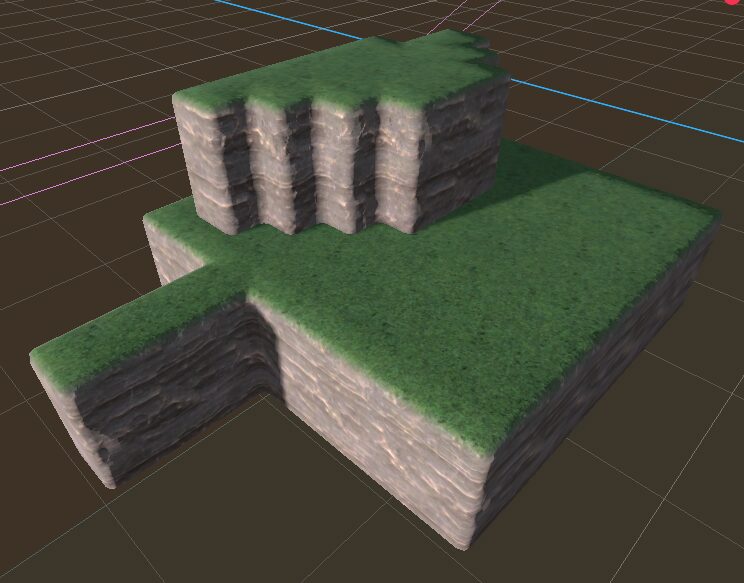
I wanted to use Godot’s GridMap with small tiles (which together make larger tiles) but ran into the issue of textures not lining up when rotating. This lead me to discover how Triplanar Mapping works, which is a technique to map textures to each plane. This allows me to use world coordinates as the “UV”, sort of.
Along the way I wanted normal mapping to work properly, which required a bit of math to ensure the tangent and binormal were facing in a consistent direction to allow normal maps to work properly.
And to ensure this works with simple textures, I made sure to make normal maps and roughness optional, providing a boolean to disable those features. (and a roughness value you can set manually, only used when roughness is disabled.)
To use this material, slap it on a mesh of your chosing, and fill in the plane textures. At minimum you’ll need the albedo defined for each, and the roughness and normal mapping can be turned off.
While this was designed for gridmaps, there’s no real reason this can’t be used for any arbitrary mesh. Just note that if that mesh moves around, the textures will slide as it’s using world coordinates.
You could probably extend this shader to allow for custom shading on positive and negative planes, allowing you to shade only the top as grass or something.
This might be handy for voxel worlds. No idea quite yet.
Shader code
shader_type spatial;
render_mode world_vertex_coords;

uniform bool enable_normal_map = false;
uniform bool enable_roughness = false;
uniform float roughness = 1;

group_uniforms x_plane;
uniform sampler2D x_albedo: source_color;
uniform sampler2D x_normal_map: hint_normal;
uniform sampler2D x_roughness: hint_roughness_r;
uniform float x_scale = 1.0;

group_uniforms y_plane;
uniform sampler2D y_albedo: source_color;
uniform sampler2D y_normal_map: hint_normal;
uniform sampler2D y_roughness: hint_roughness_r;
uniform float y_scale = 1.0;

group_uniforms z_plane;
uniform sampler2D z_albedo: source_color;
uniform sampler2D z_normal_map: hint_normal;
uniform sampler2D z_roughness: hint_roughness_r;
uniform float z_scale = 1.0;

vec3 triplanar_map(vec3 x, vec3 y, vec3 z, vec3 n) {
	n = n*n;
    return (x*n.x + y*n.y + z*n.z)/(n.x+n.y+n.z);
}

vec3 triplanar_tritexture(sampler2D x_texture, sampler2D y_texture, sampler2D z_texture, vec3 d, vec3 n) {
    vec3 colx = texture(x_texture, d.zy * x_scale).xyz;
    vec3 coly = texture(y_texture, d.xz * y_scale).xyz;
    vec3 colz = texture(z_texture, d.xy * z_scale).xyz;
    return triplanar_map(colx, coly, colz, n);
}

void fragment() {
	vec3 world_vertex = (INV_VIEW_MATRIX * vec4(VERTEX, 1.)).xyz;
	vec3 world_normal = (INV_VIEW_MATRIX * vec4(NORMAL, 0.)).xyz;
	if (enable_normal_map) {
		BINORMAL = triplanar_map(
			normalize((VIEW_MATRIX * vec4(0.,-1.,0.,0)).xyz),
			normalize((VIEW_MATRIX * vec4(0.,0.,1.,0)).xyz),
			normalize((VIEW_MATRIX * vec4(0,-1.,0.,0)).xyz),
			world_normal
		);

		TANGENT = triplanar_map(
			normalize((VIEW_MATRIX * vec4(0.,1.,0.,-1.)).xyz),
			normalize((VIEW_MATRIX * vec4(1.,0.,0.,1.)).xyz),
			normalize((VIEW_MATRIX * vec4(0,0.,1.,-1.)).xyz),
			world_normal
		);
		NORMAL_MAP = triplanar_tritexture(x_normal_map, y_normal_map, z_normal_map, world_vertex, world_normal);
	}

	ALBEDO = triplanar_tritexture(x_albedo, y_albedo, z_albedo, world_vertex, world_normal);
	if (enable_roughness) {
		ROUGHNESS = triplanar_tritexture(x_roughness, y_roughness, z_roughness, world_vertex, world_normal).r;
	} else {
		ROUGHNESS = roughness;
	}
}
Live Preview

Can’t you just add:
then remove all the INV_VIEW_MATRIX/VIEW_MATRIX transforms out of fragment?
e.g. https://gist.github.com/belzecue/e939ba8f7b451bd4caba7276caebb8a6
That only affects the vertex shader portion of it, but not the fragment shading. There’s a skip_vertex_transform render mode that does… something, but I’m really not sure, when I use it all the textures just disappear, so I didn’t bother digging into it.
Actually, now that I think of it, I could make a varying and use world_vertex_coords, then set world_vertex in the vertex shader to pass it along to the fragment shader.
I’ve got a bit of a fork of this shader I’m doing currently that uses the y-axis to affect lighting and am having to use varyings like this already so it’s maybe a good idea. Just don’t know how specific a use case my own variant of this shader is getting to be worth sharing.
For Godot’s internal triplanar shader, all the heavy lifting is being done in the vertex function. I’m mucking about with this code right now to try out Ben Golus’s various seam blending algorithms to hide the seams/mirroring.
https://gist.github.com/belzecue/55aab305ead47ebe8499cb236a8fe275
Also, need to add the missing sampler2d hints in order to get correct colors:
Good idea! I’ll throw those in. I noticed I had some funky backwards math on the XZ planes, so I’ll update with this and a quick fix to that as well!
hey there, this is actually pretty close to how I’d like to implement the shading in a game I’m working on, but I’m very new to shader coding and was wondering if there were somewhere I could message you to ask about how to modify it to get the style I’m going for?