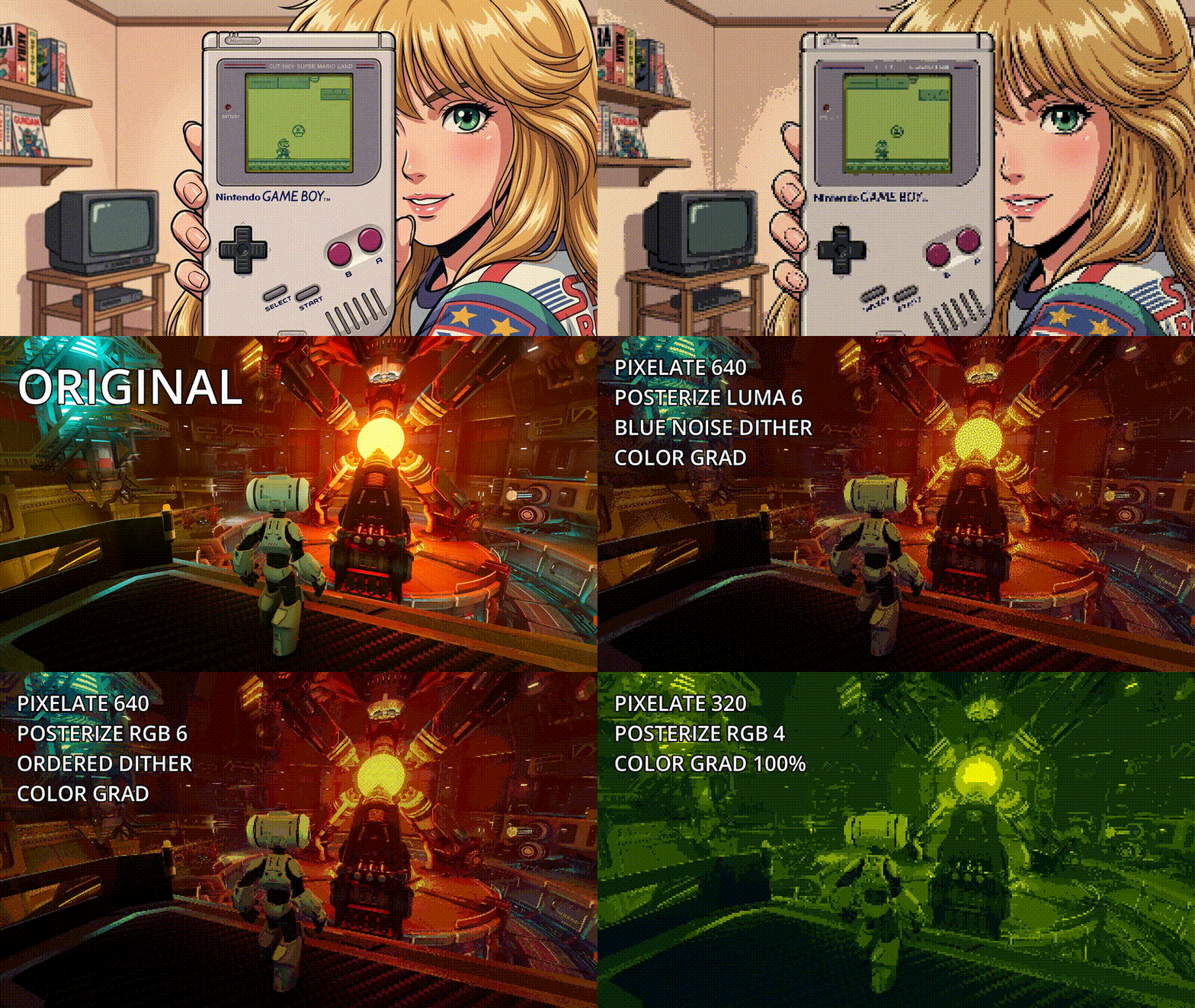
Retro Luma Color Reduction/Quantization (Posterize) + Dithering
A retro-style post-processing shader for Godot. Key features include a pixelation effect for resolution reduction, RGB or Luma color quantization (posterize), and two dithering methods available (ordered or texture-based [you can use something like a blue noise texture]). The shader also incorporates two color grading methods, one very simple and another one a bit more advanced.
You can find a detailed explanation of the shader on my youtube tutorial.
THere is also a sample project on my github.
Hope you’ll like 👾
Shader code
shader_type canvas_item;

// pixelate effect (optional)
#define USE_LOW_RESOLUTION 1

// choose only one dithering method! (optional)
#define USE_DITHERING_ORDERED 0        // ordered dithering
#define USE_DITHERING_NOISE_TEXTURE 1  // noise texture based dithering

// choose only one posterization method! (optional)
#define USE_POSTERIZE_RGB 0 // posterize RGB values
#define USE_POSTERIZE_LUMA 1 // posterize luma only

// choose only one color grad method! (optional)
#define USE_COLOR_GRAD_SIMPLE 0
#define USE_COLOR_GRAD_ADVANCED 1

uniform sampler2D screen_tex : hint_screen_texture, repeat_disable, filter_nearest; // use filter_nearest for better retro look
uniform float effect_strength : hint_range(0.0, 1.0) = 1.0;
uniform float gamma_adjust : hint_range(1.0, 4.0) = 2.2;

#if USE_LOW_RESOLUTION
uniform float desired_screen_width : hint_range(16.0, 1024.0) = 640.0;
#endif

#if USE_DITHERING_ORDERED
const float dithering_pattern[] = {
    -4.0, 0.0, -3.0, 1.0,
    2.0, -2.0, 3.0, -1.0,
    -3.0, 1.0, -4.0, 0.0,
    3.0, -1.0, 2.0, -2.0
};
#endif

#if USE_DITHERING_NOISE_TEXTURE
uniform sampler2D noise_texture : hint_default_black, filter_nearest; // only RED channel is used
#if !USE_LOW_RESOLUTION
uniform float noise_scale : hint_range(0.1, 10.0) = 4.0;
#endif
#endif

#if USE_DITHERING_ORDERED || USE_DITHERING_NOISE_TEXTURE
uniform float dither_strength : hint_range(0.0, 0.1) = 0.005;
#endif

#if USE_POSTERIZE_RGB
uniform float posterize_rgb_levels : hint_range(1.0, 32.0) = 6.0;
#endif
#if USE_POSTERIZE_LUMA
uniform float posterize_luma_levels  : hint_range(1.0, 32.0) = 6.0;
#endif

#if USE_COLOR_GRAD_SIMPLE
uniform vec3 color_grad_shadows : source_color = vec3(0.0, 0.25, 0.25);
uniform vec3 color_grad_lights : source_color = vec3(0.75, 0.75, 0.0);
#endif

#if USE_COLOR_GRAD_ADVANCED
uniform vec3 color_grad_shadows : source_color = vec3(0.0, 0.25, 0.25);
uniform vec3 color_grad_midtones : source_color = vec3(0.5, 0.0, 0.5);
uniform vec3 color_grad_lights : source_color = vec3(1.0, 1.0, 0.0);
uniform float color_grad_midpoint : hint_range(0.1, 0.9) = 0.25;
#endif

#if USE_COLOR_GRAD_SIMPLE || USE_COLOR_GRAD_ADVANCED
uniform float color_grad_strength : hint_range(0.0, 1.0) = 0.25;
#endif


#if USE_POSTERIZE_LUMA
// rgb2hsv and hsv2rgb by sam hocevar
// taken from
// https://stackoverflow.com/questions/15095909/from-rgb-to-hsv-in-opengl-glsl
// license: (PUBLIC DOMAIN) https://en.wikipedia.org/wiki/WTFPL

// All components are in the range [0…1], including hue.
vec3 rgb2hsv(vec3 c)
{
    vec4 K = vec4(0.0, -1.0 / 3.0, 2.0 / 3.0, -1.0);
    vec4 p = mix(vec4(c.bg, K.wz), vec4(c.gb, K.xy), step(c.b, c.g));
    vec4 q = mix(vec4(p.xyw, c.r), vec4(c.r, p.yzx), step(p.x, c.r));

    float d = q.x - min(q.w, q.y);
    float e = 1.0e-10;
    return vec3(abs(q.z + (q.w - q.y) / (6.0 * d + e)), d / (q.x + e), q.x);
}

vec3 hsv2rgb(vec3 c)
{
    vec4 K = vec4(1.0, 2.0 / 3.0, 1.0 / 3.0, 3.0);
    vec3 p = abs(fract(c.xxx + K.xyz) * 6.0 - K.www);
    return c.z * mix(K.xxx, clamp(p - K.xxx, 0.0, 1.0), c.y);
}
#endif

void fragment() {
	// get default UVs
	vec2 uv = UV;

#if USE_LOW_RESOLUTION
	// get screen resolution
	vec2 resolution = 1.0 / SCREEN_PIXEL_SIZE;
	// adjust UVs for lower resolution mode
    vec2 size = desired_screen_width * resolution.xy/resolution.x;
    vec2 coor = floor( FRAGCOORD.xy/resolution.xy * size);
    uv = coor / size;
#endif

   	// sample screen color
    vec4 srccol = texture(screen_tex, uv);
    vec4 tgtcol = srccol;

    // adjust gamma
    tgtcol.rgb = pow(tgtcol.rgb, vec3(1.0 / gamma_adjust));

#if USE_DITHERING_ORDERED
	// add dithering
	tgtcol.rgb += dithering_pattern[((int( coor.y ) % 4) * 4) + (int( coor.x ) % 4)] * dither_strength;
#endif

#if USE_DITHERING_NOISE_TEXTURE
	// get uvs for noise
	vec2 noise_uv = UV;

#if USE_LOW_RESOLUTION
	float noise_scale = 1.0;

	// get texture size
    ivec2 noise_res = textureSize(noise_texture, 0);

	// autoscale
	float auto_scaling_factor = desired_screen_width / (float(noise_res.x));
	noise_uv.x *= auto_scaling_factor;
	noise_uv.y *= auto_scaling_factor;
#endif

	// fix aspect ratio
	noise_uv.y *= (SCREEN_PIXEL_SIZE.x / SCREEN_PIXEL_SIZE.y);

	// sample noise texture (red channel only)
	float noise = texture(noise_texture, fract(noise_uv * noise_scale)).r;

	// add dithering
	tgtcol.rgb += vec3(((noise - 0.5) * 8.0) * dither_strength); // * 8.0 is used to match the ordered dithering "dithering_pattern" matrix values)
#endif

#if USE_DITHERING_ORDERED || USE_DITHERING_NOISE_TEXTURE
	tgtcol.rgb = clamp(tgtcol.rgb, vec3(0.0), vec3(1.0));
#endif

#if USE_POSTERIZE_RGB
	tgtcol.rgb = floor(tgtcol.rgb * posterize_rgb_levels) / posterize_rgb_levels;
#endif

#if USE_POSTERIZE_LUMA
	vec3 hsv = rgb2hsv(tgtcol.rgb);
	hsv.z = floor(hsv.z * posterize_luma_levels) / posterize_luma_levels;
	tgtcol.rgb = hsv2rgb(hsv);
#endif

#if USE_COLOR_GRAD_SIMPLE || USE_COLOR_GRAD_ADVANCED
	// get luma (convert to grayscale)
	float luma = dot(tgtcol.rgb, vec3(0.299, 0.587, 0.114));
#endif

#if USE_COLOR_GRAD_SIMPLE
	// compute tint color
	vec3 tint_col = mix(color_grad_shadows.rgb, color_grad_lights.rgb, luma);
#endif

#if USE_COLOR_GRAD_ADVANCED
	// compute tint color
	vec3 tint_col = vec3(1.0);
	if (luma < color_grad_midpoint) {
	    float t = smoothstep(0.0, color_grad_midpoint, luma);
	    tint_col = mix(color_grad_shadows.rgb, color_grad_midtones.rgb, t);
	} else {
	    float t = smoothstep(color_grad_midpoint, 1.0, luma);
	    tint_col = mix(color_grad_midtones, color_grad_lights.rgb, t);
	}
#endif

#if USE_COLOR_GRAD_SIMPLE || USE_COLOR_GRAD_ADVANCED
	// apply tint
	tgtcol.rgb = mix(tgtcol.rgb, tint_col, color_grad_strength);
#endif

    // restore gamma
    tgtcol.rgb = pow(tgtcol.rgb, vec3(gamma_adjust));

    // apply effect strength
	COLOR = mix(srccol, tgtcol, effect_strength);
}
Live Preview